Adobe Illustrator and Scientific Figure compared on the work a researcher has to finish: a paper figure, a graphical abstract, a conference poster. Adobe’s prices, formats and features are read from Adobe’s own pages on 13 November 2026. This post is written by the team that makes Scientific Figure.

Adobe Illustrator is Adobe’s vector graphics application, which Adobe describes as a graphic design tool for everything from logos and icons to graphics and illustrations. As of November 2026, Adobe lists the Illustrator plan at US$22.99/month on an annual plan billed monthly.
Scientific Figure (scientificfigure.com) is an AI scientific figure generator built for researchers. You describe a figure in plain language, or upload a hand sketch, an abstract or a full paper PDF, and Scientific Figure draws a labelled draft, usually in under a minute. Its paid plans start at $9.9/month, and the AI scientific illustration generator is the place to try it on your own figure.
The practical difference is where the work starts. In Illustrator, a research figure is built shape by shape and label by label. In Scientific Figure, the first draft arrives already drawn and labelled, and you spend your time checking and correcting it. This comparison is written by the team that makes Scientific Figure; every Adobe price, format and feature below comes from Adobe’s own pages, read on 13 November 2026.
Adobe Illustrator and Scientific Figure side by side
Scientific Figure is faster to a first draft, cheaper per month and built around research figure types. Adobe Illustrator gives full manual vector control and the widest choice of export formats.
| Attribute | Scientific Figure | Adobe Illustrator | Source |
|---|---|---|---|
| What it is | AI scientific figure generator | Vector graphic design application | Scientific Figure capabilities; Adobe Illustrator product page |
| Input | Text, sketch, reference image, abstract or paper PDF | Hand drawing, plus generative vector features | Scientific Figure capabilities; Adobe Text to Vector Graphic page |
| First draft | Usually under a minute | Drawn by hand | Scientific Figure capabilities |
| Design training needed | None for a first draft | Vector editing skills | Scientific Figure capabilities |
| Research figure types | Graphical abstracts, posters, pathways, PRISMA, cells, trees, circuits, plots | General design: logos, icons, graphics, illustrations | Scientific Figure capabilities; Adobe Illustrator product page |
| Entry paid price | $9.9/month, or $99/year | US$22.99/month, annual plan billed monthly | Scientific Figure pricing; Adobe Illustrator plans |
| Free option | 100 credits on sign-up, no card | 7-day free trial | Scientific Figure pricing; Adobe Illustrator plans |
| Student price | Same plans as everyone | Creative Cloud Pro, US$19.99/month first year | Adobe Creative Cloud plans |
| Generative AI allowance | Every render is generative | 25 generative credits/month | Adobe Illustrator plans |
| Export formats | PNG, JPG, SVG, PPTX | AI, PDF, EPS, SVG, PNG, JPEG, TIFF and more | Scientific Figure capabilities; Adobe Help, Export artwork |
| Print resolution tag | 300 dpi under 2,000 px wide, 600 dpi from 2,000 px | Set per export | Scientific Figure capabilities; Adobe Help, Export artwork |
| Publication rights | Any paid plan or credit pack, with a numbered licence certificate | Your own artwork | Scientific Figure capabilities |
| Runs on | Web browser | Windows, macOS, iPad and web | Adobe Illustrator plans; Adobe technical requirements |
The rows that decide most cases, in words. Scientific Figure produces a first draft usually in under a minute; in Illustrator the figure is drawn by hand. Scientific Figure’s paid plans start at $9.9/month; Illustrator costs US$22.99/month on Adobe’s annual plan. Scientific Figure has dedicated tools for graphical abstracts, conference posters and diagram types; Adobe presents Illustrator for logos, icons, graphics and illustrations. Illustrator exports more formats, including AI, EPS and TIFF.
How long a research figure takes in each
Scientific Figure turns a description into a labelled figure usually in under a minute, and no prompt syntax or design training is needed to get there. The figure below is a draft from its illustration generator.
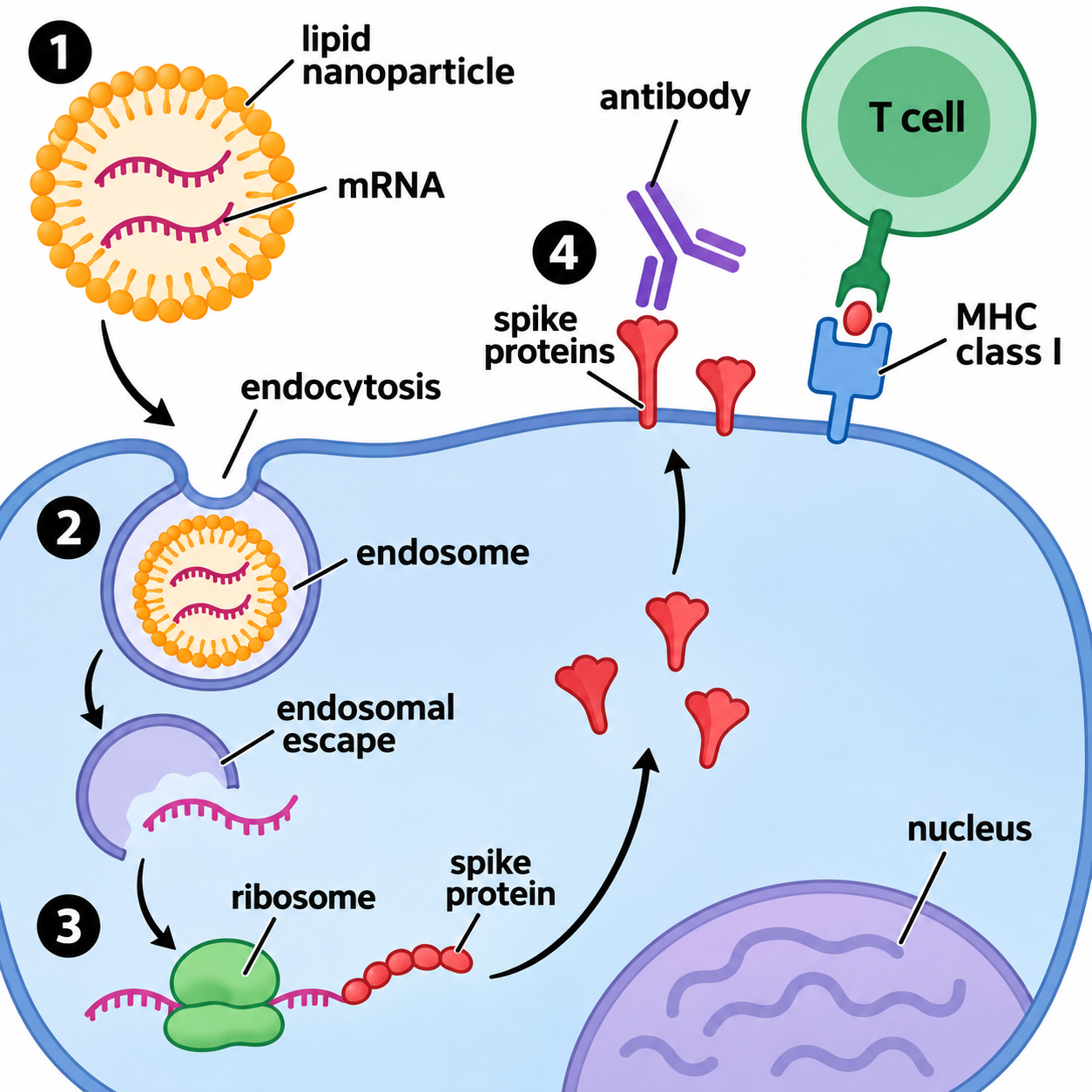
In Adobe Illustrator, the same figure starts as an empty document. The nanoparticle, the membrane, the endosome, the ribosome, every arrow and every label are drawn, placed and aligned by hand, which means learning the pen tool, layers and type tools before the figure can exist. Adobe has added generative features to Illustrator: Text to Vector Graphic generates editable vector subjects, scenes and icons from a description, and the Illustrator plan includes 25 generative credits a month. Adobe presents them as a way to kickstart design work such as on-brand assets for websites and product labels.
The time saved compounds over a paper. Each extra figure in Scientific Figure is another description; each extra figure in Illustrator is another drawing session.
Figure types built for research
Scientific Figure is organised around the figures researchers actually submit, with a dedicated tool page for each type. Adobe describes Illustrator as a general graphic design tool for logos, icons, graphics and illustrations.
- Graphical abstracts. The graphical abstract maker lays out a paper’s key finding as one visual flow, sized to Elsevier, Cell Press, ACS and MDPI specifications.
- Conference posters. The scientific poster maker turns an abstract or paper PDF into a poster layout at A0, A1 or 48 × 36 inches.
- Diagrams with fixed conventions. Pages such as the PRISMA flow diagram generator cover diagram types whose structure is set by a reporting standard, alongside pathway, cell, phylogenetic tree and circuit diagrams.
- Plots from data. Chart tools such as box plots, volcano plots and forest plots compute the geometry from your numbers in code before the figure is drawn.
Every figure can be recoloured to a journal palette (Nature, Science, NEJM, The Lancet, JAMA) or a colourblind-safe palette such as Okabe-Ito, before or after generation.
How much Adobe Illustrator costs compared with Scientific Figure
As of 13 November 2026, Adobe lists the Illustrator plan for individuals at US$22.99/month on an annual plan billed monthly, which is US$275.88 over a year. The plan includes Adobe Express Premium, 100 GB of cloud storage and 25 generative credits a month, and Adobe offers a 7-day free trial. Students and teachers are offered Creative Cloud Pro, which includes Illustrator, at US$19.99/month for the first year and US$39.99/month after that.
Scientific Figure’s plans, from its pricing page:
| Plan | Monthly | Yearly | Credits |
|---|---|---|---|
| Free | $0 | $0 | 100 on sign-up, no card |
| Lite | $9.9 | $99 | 1,200 per month |
| Pro | $29.9 | $249 | 5,000 per month |
| Plus | $49.9 | $359 | 12,000 per month |
| Credit pack | from $9.9 one-time | – | 600 that never expire |
A figure at 1K on the default model costs 30 credits, so the 1,200 monthly credits on Lite cover 40 such figures, and the 100 free credits cover three. Lite at $99/year costs just over a third of a year of Illustrator at US$275.88. Free-plan exports carry a small corner watermark and come without a publication licence or licence certificate; any paid plan or credit pack removes the watermark, unlocks 2K and 4K output and adds publication and commercial rights.
Do journals require figures made in Illustrator?
No journal requires Adobe Illustrator; journals specify file formats and resolution, not software. Nature’s final-submission guide lists Adobe Illustrator (AI), Postscript, vector EPS or PDF for figures containing line drawings and graphs, and also accepts JPEG at 300–600 dpi and Microsoft Word, Excel or PowerPoint files. Nature asks for photographic images at a minimum of 300 dpi at the size they will be used, and its standard figure widths are 89 mm for a single column and 183 mm for a double column.
Scientific Figure exports are prepared for those rules. PNG and JPG exports carry a print resolution tag matched to their pixel width: 300 dpi below 2,000 px and 600 dpi from 2,000 px. A 1K figure is 1,536 px wide, which at 300 dpi prints 130 mm wide, wider than an 89 mm single column. On paid plans the SVG export keeps text as text and shapes as shapes, and the PPTX export is an editable slide with native text and shapes.
If your figure was generated with AI, check your target journal’s disclosure rules first; our guide to AI-generated figures in journals sets out what fourteen publishers allow.
Editing an AI figure after it is generated
A Scientific Figure draft is a starting point you can keep changing. In the workspace you can describe a change in words, brush over a region and redraw it, correct a label without touching the rest, remove a background, or recolour the whole figure to a palette. Edit in Canvas goes further: it splits the finished figure into editable objects (text blocks, panels, shapes and traced paths) that you can move, restyle or rewrite in the browser, then export as SVG or editable PPTX. Edit in Canvas costs 150 credits per figure, and later SVG or PPTX exports of the same figure reuse it.
That SVG opens in Illustrator, Inkscape or Figma. Labs that own Illustrator licences can use both tools in sequence: draft in Scientific Figure in minutes, then open the SVG in Illustrator for a final manual pass.
Where Adobe Illustrator is the better tool
Adobe Illustrator is the better tool when the job is exact manual vector work. It gives you control of every anchor point, stroke and type setting, and it saves to AI, PDF and EPS and exports to formats such as SVG, PNG, JPEG and TIFF. It is also the stronger choice for assembling a multi-panel figure from plots you already exported as PDF or EPS, because it opens and places both formats on one artboard. Both cases are about finishing artwork that already exists, and that is where a Scientific Figure draft fits in front of it.
Illustrator vs Inkscape for scientific figures
Inkscape is the free alternative to Illustrator. The Inkscape project describes it as a free and open-source vector graphics editor that uses SVG as its main format and exports PNG and several vector formats, and its binaries are covered by the GNU GPL version 3 or later. For a researcher, Inkscape and Illustrator solve the same problem in the same way: both are drawing tools, so every part of the figure is still built by hand. Between the two, Inkscape costs nothing; between either of them and Scientific Figure, the choice is drawing against describing. Our comparison of BioRender alternatives covers Inkscape, Figma, TikZ and PowerPoint in more detail.
Which is better for each task
- A first-draft figure from a text description: Scientific Figure, which drafts it in under a minute.
- A graphical abstract: Scientific Figure, whose graphical abstract maker is sized to Elsevier, Cell Press, ACS and MDPI specifications.
- A conference poster: Scientific Figure, whose poster maker turns a paper PDF into a layout at A0, A1 or 48 × 36 inches.
- A multi-panel figure assembled from existing plots: Adobe Illustrator, which places PDF and EPS plots on one artboard.
- Exact vector editing of every path: Adobe Illustrator, which gives full manual control.
- A tight budget: Scientific Figure, from $9.9/month or 100 free credits, against US$22.99/month for Illustrator.
- No design training: Scientific Figure, which needs only a plain-language description.
Frequently asked questions
Is Adobe Illustrator good for scientific figures?
Adobe Illustrator is a capable vector editor for scientific figures if you already know how to use it, because it gives exact control over every path and label and exports AI, PDF, EPS, SVG and TIFF. It is a general graphic design application, so every shape, arrow and label of a research figure is drawn by hand. For a researcher without design training who needs a figure this week, Scientific Figure produces a labelled draft from a text description in under a minute.
Can AI replace Illustrator for scientific figures?
For drafting schematics, graphical abstracts and posters, yes: Scientific Figure generates a labelled figure from a description, a sketch or a paper PDF, and exports PNG, JPG, SVG and editable PPTX. Illustrator is still the tool for exact manual vector work and for assembling multi-panel figures from plots made elsewhere. You can draft in Scientific Figure and open the SVG export in Illustrator only when a figure needs a last manual pass.
What is the best alternative to Illustrator for scientific figures?
Scientific Figure is the best alternative to Illustrator for researchers who want a finished figure rather than a drawing tool, because it drafts the figure for you in under a minute and has dedicated tools for graphical abstracts, posters and diagram types such as PRISMA flow diagrams. Paid plans start at $9.9/month, and every new account gets 100 free credits without a card. Inkscape is the free alternative if you want to keep drawing by hand in a vector editor.
Do journals require figures made in Illustrator?
No. Journals specify file formats and resolution, not software. Nature, for example, lists Adobe Illustrator (AI), Postscript, vector EPS or PDF for line art, and also accepts JPEG at 300–600 dpi and Word, Excel or PowerPoint files. Scientific Figure exports PNG and JPG tagged at 300 or 600 dpi, plus SVG and editable PPTX on paid plans.
How much does Adobe Illustrator cost for students?
Adobe’s student and teacher offer, as of November 2026, is Creative Cloud Pro, which includes Illustrator, at US$19.99/month for the first year and US$39.99/month after that, on an annual plan. The Illustrator single-app plan for individuals is US$22.99/month, annual, billed monthly. Scientific Figure has no separate student tier; its plans start at $9.9/month, or $99/year.
Is Adobe Illustrator worth it for scientists?
Adobe Illustrator is worth it for scientists who draw figures by hand often and want full manual control, or who assemble many multi-panel figures from existing plots. For a researcher who needs a few schematics, a graphical abstract or a poster a year, US$22.99/month buys a general design tool that still has to be learned and drawn in. Scientific Figure costs $9.9/month on its entry plan and drafts the figure itself.
What is Scientific Figure?
Scientific Figure is an AI scientific figure generator at scientificfigure.com. It turns a plain-language description, a hand sketch, an abstract or a full paper PDF into a labelled figure, graphical abstract or conference poster, which can then be edited and exported as PNG, JPG, SVG or editable PPTX. New accounts get 100 free credits, and any paid plan or credit pack includes publication and commercial rights.
Can I open a Scientific Figure export in Illustrator?
Yes. Scientific Figure’s SVG export keeps text as text and shapes as shapes, and the file opens for editing in Illustrator, Inkscape or Figma. SVG and PPTX export are part of the paid plans and credit packs, and the first SVG or PPTX export of a figure costs 150 credits.
Is Inkscape as good as Illustrator for scientific figures?
Inkscape is a free and open-source vector editor that uses SVG as its main format and exports PNG and several vector formats. Like Illustrator, it is a drawing tool, so you build every part of the figure yourself. If you want the figure drafted for you, use Scientific Figure and open its SVG export in Inkscape or Illustrator to adjust it by hand.
Where to go next
- Scientific poster maker for a conference poster layout from your paper PDF
- Graphical abstract maker for a journal-sized abstract from your paper
- How to make scientific figures, the full workflow from sketch to submission
- Pricing for every plan and credit pack
Источники
- Adobe Illustrator plans and pricing — Adobehttps://www.adobe.com/products/illustrator/plans.htmlДата обращения: 13 нояб. 2026 г.
- Creative Cloud plans and pricing — Adobehttps://www.adobe.com/creativecloud/plans.htmlДата обращения: 13 нояб. 2026 г.
- Vector Graphics Software | Adobe Illustrator — Adobehttps://www.adobe.com/products/illustrator.htmlДата обращения: 13 нояб. 2026 г.
- Text to Vector Graphic in Adobe Illustrator — Adobehttps://www.adobe.com/products/illustrator/text-to-vector-graphic.htmlДата обращения: 13 нояб. 2026 г.
- Supported file formats (Illustrator on desktop) — Adobehttps://helpx.adobe.com/illustrator/desktop/get-started/learn-the-basics/supported-file-formats.htmlДата обращения: 13 нояб. 2026 г.
- Export artwork from Illustrator — Adobehttps://helpx.adobe.com/illustrator/desktop/save-and-export/export-files-to-different-formats/export-artwork-from-illustrator.htmlДата обращения: 13 нояб. 2026 г.
- Illustrator on desktop technical requirements — Adobehttps://helpx.adobe.com/illustrator/desktop/get-started/learn-the-basics/technical-requirements.htmlДата обращения: 13 нояб. 2026 г.
- Nature — Formatting guide for final submission — Springer Naturehttps://www.nature.com/nature/for-authors/final-submissionДата обращения: 13 нояб. 2026 г.
- Inkscape README — Inkscape Projecthttps://gitlab.com/inkscape/inkscape/-/blob/master/README.mdДата обращения: 13 нояб. 2026 г.
- Inkscape license (COPYING) — Inkscape Projecthttps://gitlab.com/inkscape/inkscape/-/blob/master/COPYINGДата обращения: 13 нояб. 2026 г.
- Scientific Figure pricing and credits — Scientific Figurehttps://scientificfigure.com/pricing.mdДата обращения: 13 нояб. 2026 г.
- Scientific Figure capabilities — Scientific Figurehttps://scientificfigure.com/capabilities.mdДата обращения: 13 нояб. 2026 г.
Названия журналов, конференций и продуктов являются товарными знаками их правообладателей. Эта страница — независимый редакционный материал, не аффилированный с ними и не одобренный ими. Требования меняются: сверьте каждый пункт с официальными источниками по ссылкам выше перед подачей или печатью.