
Scientific Figure Enhancer for Old Slides and Blurry Exports
Upload an old paper figure, a PowerPoint slide or a blurry export and say in one line what to change. The figure enhancer redraws it with the same panels, labels and values, in one typeface, one line weight and one palette.
One slide before and after the figure enhancer
A two-panel slide in seven typefaces and clashing colors, saved as a low-quality JPEG, then sent through the figure enhancer with the default style.
Unify the fonts and colors.
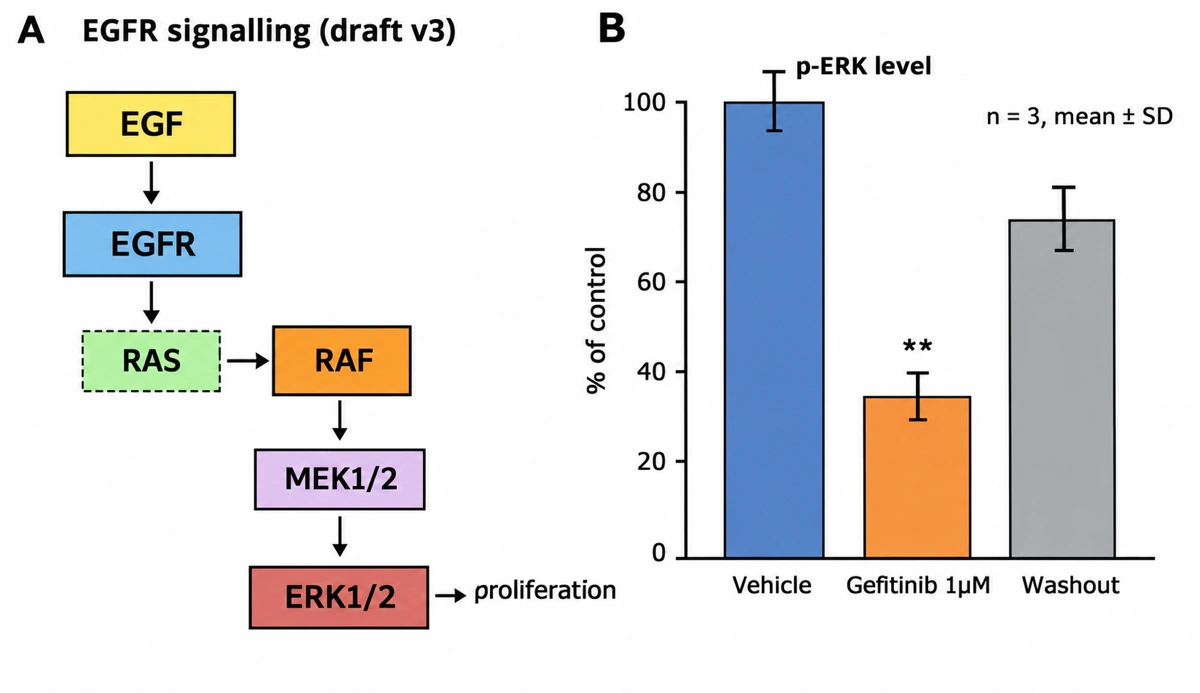
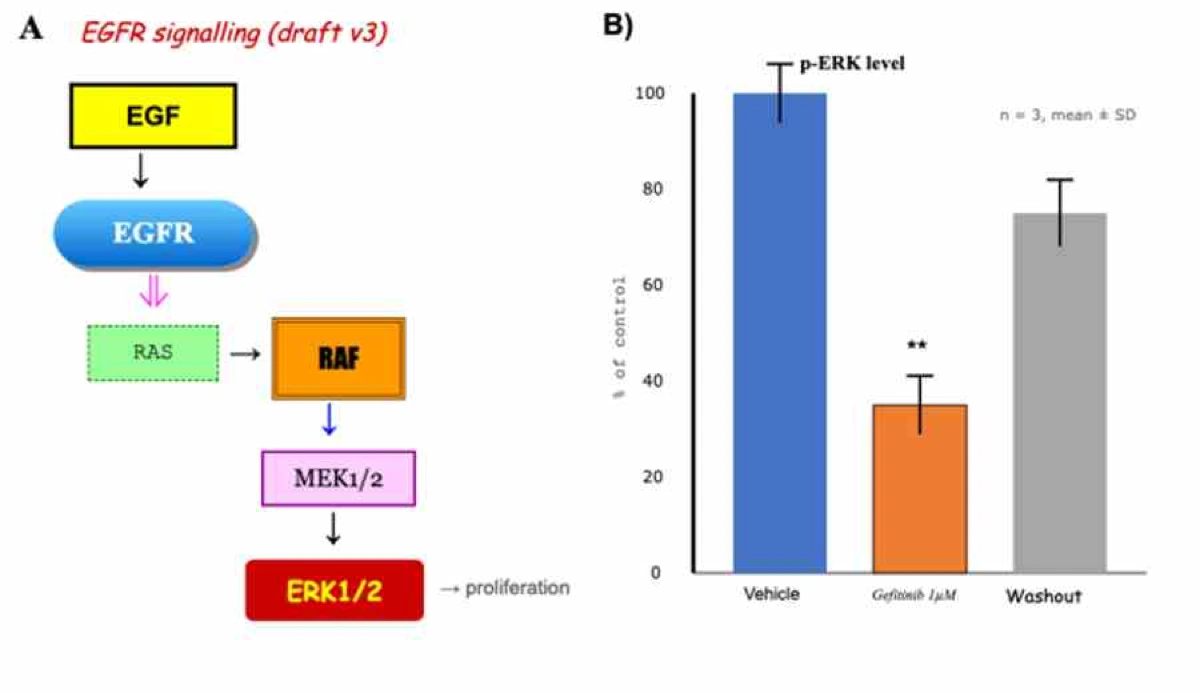
Data copiedThe figure enhancer kept the ticks, three bar heights, error bars and ** mark.
7 typefaces to 1Boxes share one shape and border, arrows one color and weight.
Every label keptSame wording and panel order. The red italic title became plain.
Small symbols the figure enhancer can get wrong
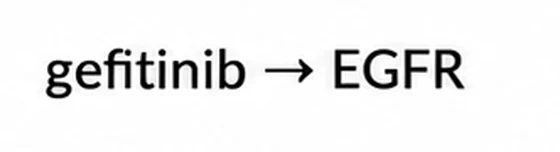
A mark a dozen pixels wide can be too blurred to read. In the note gefitinib ⊣ EGFR on a compressed slide, the figure enhancer drew the inhibition bar as a plain arrow, which reverses the meaning, even though the typed line asked to keep it.
Check these against your original
- Inhibition bars and other flat-ended connectors
- Subscripts and superscripts, such as Ca²⁺ or CO₂
- Small arrowheads and the way they point
- Significance marks such as *, ** and n.s.
Send the highest-resolution copy you have, so each mark is more than a smudge, and correct a changed mark afterwards in Edit in Canvas.
Attach the sharpest copy you have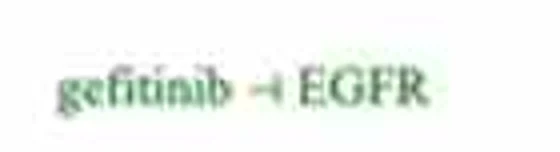
What the figure enhancer keeps and what it redraws
The figure enhancer copies everything a reader takes information from and redraws everything else. The notes say what to check.
| In your upload | After the figure enhancer | Notes |
|---|---|---|
| Panels, order and letters | Kept | Panels stay in order. To drop or move one, say so in your line |
| Label wording | Kept word for word | Spelling is left alone unless your line asks for a correction |
| Ticks, bars, error bars, significance marks | Copied from the image | Copied rather than recomputed, so compare them with your source |
| Arrows and connectors | Direction kept | One color and weight. A small inhibition bar became a plain arrow, so check every head |
| Fonts | One typeface | Mixed typefaces become one, and a colored italic title becomes plain |
| Colors | One palette for fills | Fills follow the style or the Palette pill, and groups stay distinct. Colored text can keep its old color |
| Boxes and line weights | Made uniform | Boxes of one kind get one shape, fill and border |
| Blur, jagged edges, JPEG blocks | Gone | No old pixels are reused. The figure enhancer draws it again at 1K, 2K or 4K |
The figure is drawn again, not traced. A copied value can slip, so compare tick labels, bar heights and p-values with your source before the enhanced figure goes into a manuscript.
Run the figure enhancer on yoursPreparing an upload for the figure enhancer
Most uploads to the figure enhancer come from one of four places, and each exports a little differently.
A slide pieced together in PowerPoint
Text boxes in three fonts, arrows from the shapes menu, icons from two sites. Select everything, right-click and choose Save as Picture to drop the slide around it. The figure enhancer returns one consistent drawing.
A screenshot from an old PDF
Zoom to 200 or 300 percent before the screenshot so the smallest label and symbol are readable. If a label is still a smudge, type what it says in your line (y-axis reads Relative expression, a.u.) for the figure enhancer to copy.
A lab figure several people added to
Write unify the look to keep the content as it is, or add a change to the same line, such as rename WT to Control in every panel, then check each panel where WT appeared.
A panel that has to match the rest of the paper
Pick the style the other figures use, then open the Palette pill, choose Custom and upload one of them as PNG or JPG; up to four colors are taken from it. Journal palettes and Okabe-Ito are in the same menu.
Figure enhancer or Upscale for a blurry figure
A figure the journal sent back for resolution needs one of two fixes. If it is sharp and only small, Upscale adds pixels without redrawing anything. If its text is already blurry, the figure enhancer redraws it, and a landscape result at 1K is 1,536 pixels wide, about 5.1 inches at the 300 dpi stamped on export. Run the figure enhancer first, then upscale the version you keep.
| Figure enhancer (this page) | Upscale (in the workspace) | |
|---|---|---|
| What happens | Your upload is drawn again, panel by panel | The finished image is enlarged without being redrawn |
| Fonts, colors and line weights | Made consistent, in the style you pick | Left exactly as they are |
| Labels and values | Copied by the redraw, so check them | Unchanged, because nothing is redrawn |
| Starting point | Any PNG, JPG or WebP up to 10 MB | A result in your workspace, an enhanced one included |
| Resolution | 1K on the free tier, 2K and 4K on paid plans and credit packs | 2K and 4K on paid plans and credit packs, 8K on Pro and above and with credit packs |
Once the figure enhancer is done
- 1
Compare with the original
Panel by panel, labels first, then every axis number and every small symbol.
- 2
Retype in Edit in Canvas
Text becomes real text and panels movable objects, so a misread gene name is fixed in place, not regenerated.
- 3
Recolor to a journal palette
Nature, Science, NEJM, Lancet, JAMA or Okabe-Ito, to match the journal or the paper's other panels.
- 4
Export
PNG and JPG on every account, stamped at 300 dpi below 2,000 pixels wide and 600 dpi from there up. Layered SVG and editable PPTX on paid plans and credit packs.
What the figure enhancer will not do
- It does not fill in missing data. The figure enhancer adds nothing your upload lacks, so send the whole figure, not a crop that cuts off a panel or an error bar.
- It does not recalculate results. Values are copied as drawn, and a copy can slip, so check each one against your source.
- It is not for photographic data. Micrographs, gels, blots and scans are evidence, and major publishers do not accept them altered with AI. Run only the drawn part through the figure enhancer and keep the image panels from your original files.
- It does not change who owns the figure. A redrawn panel from someone else's paper still needs the permission or citation the original would.
- It does not clear the journal's AI rules. Many publishers want the tool named in the legend and some refuse AI-made images. Our guide to journal AI figure policies compares 14 of them.
Figure enhancer questions
Will the figure enhancer keep my numbers and labels?
It copies them, it does not recompute them. The figure enhancer keeps every label, tick value and data mark as drawn. Very small marks, such as a blurred inhibition bar, are the ones most likely to change, so check each value against your source.
Why do I have to type a line as well as attach the figure?
The figure enhancer needs to know what to change. Unify the fonts and colors is enough for a straight clean-up. Add anything else to the same line, such as keep the original colors or rename WT to Control.
Can I keep my original colors?
Ask for it in your line. With keep the original colors, the figure enhancer changes only fonts, line weights and spacing. Compare the colors with your upload, since colored text does not always follow the palette.
Does the style I pick change the content?
No, the style changes only how things are drawn. It sets outlines, shading and fills, while panels, labels and arrows stay where your upload has them. With no style picked the figure enhancer uses the default Scientific style, as in the example above.
Can I enhance a chart or plot?
Yes, as a picture of the chart. The figure enhancer copies bars, points and axes from your image rather than calculating them. With the data in hand, a plot maker draws the chart from the numbers, the safer choice for peer review.
Is the figure enhancer free?
New accounts get free credits with no card required. Figure enhancer results on the free tier are 1K, watermarked and without publication rights. 2K or 4K and every Upscale need a paid plan or a credit pack.
Can I upload a PDF?
The figure enhancer takes images only. Send PNG, JPG or WebP up to 10 MB, so screenshot the page at 200 percent zoom or export the figure as an image. Uploads are encrypted and never used to train models.
Keep exploring
Our other diagram tools, and the guides behind them.
Tools
Run an old slide through the figure enhancer
Attach it as it is and type one line, such as unify the fonts and colors. Then check the small symbols.
Open the figure enhancer